OpenAPI/swagger
RESTful 서비스를 문서화할 때 가장 일반적으로 사용하는 사양이며, 주요 API gateway의 상당수가 swagger를 기본 지원한다.
Spring Fox
Spring fox를 사용하면 API를 구현하는 소스 코드와 연동해 API를 문서화할 수 있다. 이런 기능은 매우 중요한데, 자바 코드와 API 문서의 수명 주기가 다르면 시간이 지나면서 쉽게 어긋나기 때문이다.
생각보다 빠르게 어긋난다고 한다.
RESTful API의 문서화 관점에서 보면 API를 구현하는 Java Class가 아닌 Java Interface에 API 문서를 추가하는 게 낫다.
2015년 스마트베어 소프트웨어(SmartBear Software)가 리눅스 재단(Linux Foundation) 산하의 Open API 이니셔티브(Initiative)에 Swagger 사양을 기부하고 OpenAPI 사양을 만들었다.
Spring fox는 개발자가 설정한 구성 정보나 Spring Webflux, Swagger Annotation에서 얻은 구성 정보를 바탕으로 API 문서를 생성한다.
OpenAPI는 Spring fox v3에서 지원할 예정이다.
build.gradle
implementation('io.springfox:springfox-boot-starter:3.0.0')
configuration
@SpringBootApplication @ComponentScan("se.magnus") public class ProductCompositeServiceApplication { @Value("${api.common.version}") String apiVersion; @Value("${api.common.title}") String apiTitle; @Value("${api.common.description}") String apiDescription; @Value("${api.common.termsOfServiceUrl}") String apiTermsOfServiceUrl; @Value("${api.common.license}") String apiLicense; @Value("${api.common.licenseUrl}") String apiLicenseUrl; @Value("${api.common.contact.name}") String apiContactName; @Value("${api.common.contact.url}") String apiContactUrl; @Value("${api.common.contact.email}") String apiContactEmail; .... @Bean public Docket apiDocumentation() { return new Docket(SWAGGER_2) .select() .apis(basePackage("se.magnus.microservices.composite.product")) .paths(PathSelectors.any()) .build() .globalResponseMessage(GET, emptyList()) .apiInfo(new ApiInfo( apiTitle, apiDescription, apiVersion, apiTermsOfServiceUrl, new Contact(apiContactName, apiContactUrl, apiContactEmail), apiLicense, apiLicenseUrl, emptyList() )); } } - Swagger v2 문서를 생성하고자 Docket Bean을 초기화 한다.
- apis(), paths() method로 spring fox가 api 정보를 찾을 위치를 지정한다.
- globalREsponseMessage() method를 사용해 spring fox가 기본 http 응답 코드(예: 401, 403)을 추가하지 않게 한다.(예제에서는 응답코드가 불필요해서 빠져있다.)
- api* 변수로 Docket bean을 구성한다. 구성에 들어가는 API 정보를 spring의 @Value annotation을 사용해 속성 파일에서 초기화된다. @Value annotation은 다음과 같다.
@Value("${api.common.version}") String apiVersion; @Value("${api.common.title}") String apiTitle; @Value("${api.common.description}") String apiDescription; @Value("${api.common.termsOfServiceUrl}") String apiTermsOfServiceUrl; @Value("${api.common.license}") String apiLicense; @Value("${api.common.licenseUrl}") String apiLicenseUrl; @Value("${api.common.contact.name}") String apiContactName; @Value("${api.common.contact.url}") String apiContactUrl; @Value("${api.common.contact.email}") String apiContactEmail;
application.yml에 작성된 내용
api: common: version: 1.0.0 title: Sample API description: Description of the API... termsOfServiceUrl: MINE TERMS OF SERVICE URL license: License licenseUrl: MY LICENSE URL contact: name: Contact url: My email: me@mail.com product-composite: get-composite-product: description: Returns a composite view of the specified product id notes: | # Normal response If the requested product id is found the method will return information regarding: 1. Base product information 1. Reviews 1. Recommendations 1. Service Addresses\n(technical information regarding the addresses of the microservices that created the response) # Expected partial and error responses In the following cases, only a partial response be created (used to simplify testing of error conditions) ## Product id 113 200 - Ok, but no recommendations will be returned ## Product id 213 200 - Ok, but no reviews will be returned ## Non numerical product id 400 - A **Bad Request** error will be returned ## Product id 13 404 - A **Not Found** error will be returned ## Negative product ids 422 - An **Unprocessable Entity** error will be returned API 정보 추가
API의 정보를 제공하는 @ApiOperation annotation을 java interface에 추가한다. 각 RESTful 오퍼레이션의 해당 java method에 @ApiResponse annotation 및 @ApiOperation annotation을 추가해 오퍼레이션과 오류 응답을 설명한다.
spring fox는 spring의 @GetMapping annotation을 검사해 오퍼레이션의 입력 매개변수와 응답유형을 파악한다.
리소스 수준의 API 정보는 다음과 같이 작성한다.
@Api(description = "REST API for composite product information.") public interface ProductCompositeService { 단일 API 오퍼레이션을 문서화 하는 방법은 다음과 같이 작성한다.
@ApiOperation( value = "${api.product-composite.get-composite-product.description}", notes = "${api.product-composite.get-composite-product.notes}") @ApiResponses(value = { @ApiResponse(code = 400, message = "Bad Request, invalid format of the request. See response message for more information."), @ApiResponse(code = 404, message = "Not found, the specified id does not exist."), @ApiResponse(code = 422, message = "Unprocessable entity, input parameters caused the processing to fails. See response message for more information.") }) @GetMapping( value = "/product-composite/{productId}", produces = "application/json") ProductAggregate getProduct(@PathVariable int productId); @ApiOperation swagger annotation의 값을 지정할 때는 @Value annotation을 사용하지 않고 속성 자리 표시자를 직접 사용한다. (ex: ${bar.foo})
@ApiResponses anntation 안에 있는 오류 코드에 대해선 속성 자리 표시자를 사용할 수 없다. 따라서 각 오류 코드에 대한 설명을 java source code에 직접 입력한다.
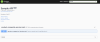 - Spring fox Docket Bean에 지정한 일반 정보, 실제 스웨거 문서의 링크 (http://localhost:8080/v2/api-docs)
- API 리소스 목록: 지금은 product-composite-service api만 있다.
- page 하단에는 API엣 사용하는 모델을 검사하는 항목이 있다.
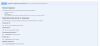 - 오퍼레이션에 대한 한 줄 설명
- 지원하는 입력 매개 변수 등 오퍼레이션을 자세히 설명하는 항목. @ApiOperation annotation에 markdown 문법으로 입력한 내용이 랜더링 된다.
Spring fox는 spring webflux와 swagger annotation을 검사해서 swagger 기반 API 문서를 런타임에 즉시 생성하는 오픈 소스 프로젝트다. API를 설명하는 텍스트는 java source code의 annotation에 넣을 수 있으며, 쉽게 텍스트를 편집할 수 있도록 속성파일에 넣을 수도 있다.
/v2/api-docs/ 호출시 응답
// 20230105154050 // <http://localhost:8080/v2/api-docs#/definitions/RecommendationSummary> { "swagger": "2.0", "info": { "description": "Description of the API...", "version": "1.0.0", "title": "Sample API", "termsOfService": "MINE TERMS OF SERVICE URL", "contact": { "name": "Contact", "url": "My", "email": "me@mail.com" }, "license": { "name": "License", "url": "MY LICENSE URL" } }, "host": "localhost:8080", "basePath": "/", "tags": [ { "name": "product-composite-service-impl", "description": "REST API for composite product information." } ], "paths": { "/product-composite/{productId}": { "get": { "tags": [ "product-composite-service-impl" ], "summary": "Returns a composite view of the specified product id", "description": "# Normal response\nIf the requested product id is found the method will return information regarding:\n1. Base product information\n1. Reviews\n1. Recommendations\n1. Service Addresses\\n(technical information regarding the addresses of the microservices that created the response)\n\n# Expected partial and error responses\nIn the following cases, only a partial response be created (used to simplify testing of error conditions)\n\n## Product id 113\n200 - Ok, but no recommendations will be returned\n\n## Product id 213\n200 - Ok, but no reviews will be returned\n\n## Non numerical product id\n400 - A **Bad Request** error will be returned\n\n## Product id 13\n404 - A **Not Found** error will be returned\n\n## Negative product ids\n422 - An **Unprocessable Entity** error will be returned\n", "operationId": "getProductUsingGET", "produces": [ "application/json" ], "parameters": [ { "name": "productId", "in": "path", "description": "productId", "required": true, "type": "integer", "format": "int32" } ], "responses": { "200": { "description": "OK", "schema": { "$ref": "#/definitions/ProductAggregate" } }, "400": { "description": "Bad Request, invalid format of the request. See response message for more information." }, "401": { "description": "Unauthorized" }, "403": { "description": "Forbidden" }, "404": { "description": "Not found, the specified id does not exist." }, "422": { "description": "Unprocessable entity, input parameters caused the processing to fails. See response message for more information." } } } } }, "definitions": { "ProductAggregate": { "type": "object", "properties": { "name": { "type": "string" }, "productId": { "type": "integer", "format": "int32" }, "recommendations": { "type": "array", "items": { "$ref": "#/definitions/RecommendationSummary" } }, "reviews": { "type": "array", "items": { "$ref": "#/definitions/ReviewSummary" } }, "serviceAddresses": { "$ref": "#/definitions/ServiceAddresses" }, "weight": { "type": "integer", "format": "int32" } }, "title": "ProductAggregate" }, "RecommendationSummary": { "type": "object", "properties": { "author": { "type": "string" }, "rate": { "type": "integer", "format": "int32" }, "recommendationId": { "type": "integer", "format": "int32" } }, "title": "RecommendationSummary" }, "ReviewSummary": { "type": "object", "properties": { "author": { "type": "string" }, "reviewId": { "type": "integer", "format": "int32" }, "subject": { "type": "string" } }, "title": "ReviewSummary" }, "ServiceAddresses": { "type": "object", "properties": { "cmp": { "type": "string" }, "pro": { "type": "string" }, "rec": { "type": "string" }, "rev": { "type": "string" } }, "title": "ServiceAddresses" } } }