node,js (Express ) + jade + scrollMagic 을 이용한 프리젠테이션 사이트 진행중.
github repository 공유
https://github.com/audtjddld/scrollMagic_website/tree/master/WebSite
별다른 기능 없이 단순 view만 보여줄 예정이기 때문에
server를 node로 띄우고 같이 작업할 퍼블리셔와 함께 사용해서 진행 할 예정이다.
node.js에서는 view template를 선택할 수 있는데, 그 엔진들은 jade, ejs,..등등 이 있는데
각각 스타일을 보면 간순명료하게 가는건 jade가, json을 이용해서 화면단을 꾸미는건 ejs가 아닐까라고 개인적으로 생각 함.
(기존 html 파일은 view engine이 없기 때문에 File System을 이용하여 읽어서 보여줘야 된다 .ㅎㅎ)**
조대협님 블로그 : http://bcho.tistory.com/887
를 보면 각각 코드 스타일을 확인 할 수 있다.
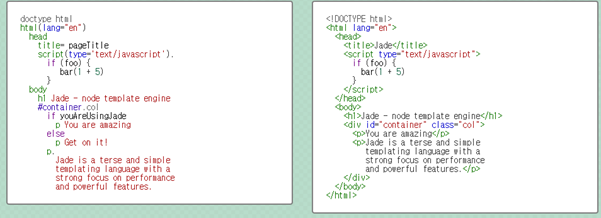
jade는 특이한게 탭(tab)키로 들여쓰기를 하게되면 파싱 에러가 난다 -_-;; 그래서 스페이스바로 정성스럽게 해줘야된다. **
위에 공유된 예제에서는 jade를 이용하여 작성을 했다.
jade API
Jade - Template Enginejade-lang.com
1
2
3
4
5
6
7
8
9
10
11
12
13
14
15
16
17
18
19
doctype html
html.no-js
head
title= title
link(rel=’stylesheet’, href=’/stylesheets/style.css’)
link(rel=’stylesheet’, href=’/stylesheets/view.css’)
link(rel=’stylesheet’, href=’/stylesheets/pace-theme-fill-left.tmpl.css’)
script(src=’/js/lib/jquery.min.js’)
script(src=’/js/lib/modernizr.custom.min.js’)
script(src=’/js/lib/highlight.pack.js’)
script(src=’/js/lib/greensock/TweenMax.min.js’)
script(src=’/js/pace.js’)
script(src=’/scrollmagic/uncompressed/ScrollMagic.js’)
script(src=’/scrollmagic/uncompressed/plugins/animation.gsap.js’)
script(src=’/scrollmagic/uncompressed/plugins/debug.addIndicators.js’)
body
block content
layout.jade 파일에 header파일 공통 영역을 선언해놓고
presentation.jade 파일에
1
2
3
4
5
6
7
8
9
10
11
12
13
14
15
16
17
18
19
20
21
22
23
24
25
26
27
28
29
30
31
32
33
34
35
36
37
38
39
40
41
42
43
44
45
46
47
48
49
50
51
52
53
54
55
56
57
58
59
60
61
62
extends layout
block content
div.paceDiv
section
form.move
fieldset
legend Anchor Links
p#menu1
a(href=’#pinContainer’) 상위 슬라이드
p#menu2
a(href=’#trigger1’) CSS 토글
p#menu3
a(href=’#trigger2’) box 색변환
p#menu4
a(href=’#triggerPin’) Pin/Unpin
p#menu5
a(href=’#trigger3’) box 움직이기
#pinContainer
section.panel.blue
b ONE
section.panel.turqoise
b TWO
section.panel.green
b THREE
section.panel.bordeaux
b FOUR
script
include ../public/js/view.js
#trigger1
#animateArea1.animateArea
#animate1.box1.red
p.
Zap
.spacerArea
#trigger2
#animateArea2.animateArea
#animate2.box1.green
p.
This is a grey area
#triggerPin
#animateAra3.animateArea
#pin.box1
p
img(src=’/images/7.gif’,alt=’움짤’)
.spacerArea
#trigger3
#animate3.box1.red
p Let’s draw!
다음과 같이 작성했다.
작성시 주의 사항은 열고 닫는 부분을 같은 위치에 dom을 정의해줘야한다.
안그러면 파싱시 무시되고 element가 누락되고 화면이 구성된다.
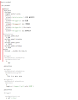
그림을 보면 빨간선에 맞춰서 잘 작성해야지 누락 없이 잘 나타난다는 내용이다.
그리고 script를 도중에 바로 넣을 수 없기 때문에 각 js파일을 생성하고,
include해서 넣는 방법으로 되어야 한다.
전반적으로 nodeclipse를 다운 받고 Excpress 모듈 생성 후 서버 띄우는건 정말 순식간이기 때문에 ;;
편리하게 자기가 작성한 브라우저를 별도의 서버를 힘겹게 구성할 필요 없이 바로 확인하며 진행 할 수 있는게 장점이 아닐까 생각한다.